Geo filtering of data sources for Pro users
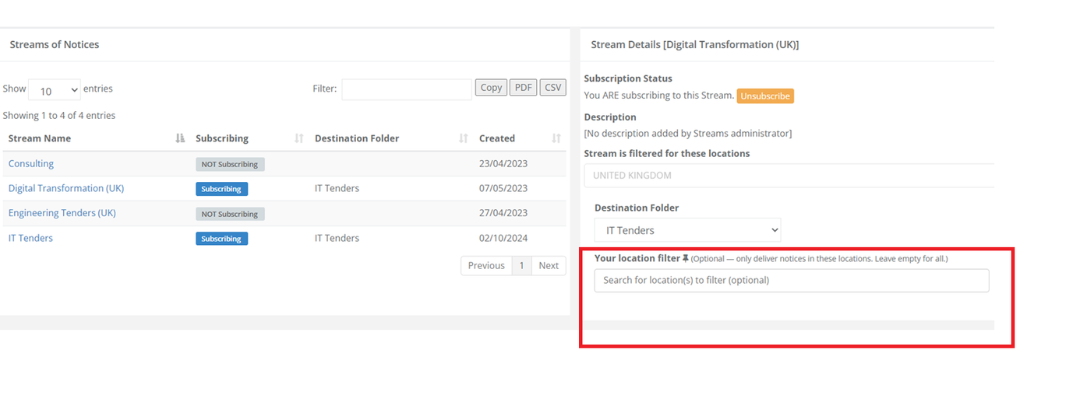
Tenderlake Pro users can now apply location filters to their Streams, narrowing the notices they receive to specific countries
Tenderlake Pro users can now apply location filters to their Streams, narrowing the notices they receive to specific countries
We've introduced location filtering for Pro users: A small change with significant impact for organisations whose Pro users cover different geographies across similar products or services.
Pro users manage their data sources under Data Sources → Streams.
When selecting a Stream they're subscribed to, they can now apply location filters to narrow the notices they receive.
For example: a workgroup manager might create a Stream for a specific product or services covering matches across the whole of Europe, the UK, and sometimes the US and Canada.
A Pro user focused on Benelux can now filter that same Stream to the Netherlands, Belgium, and Luxembourg, and only see notices from those countries that matter to them.
What this means for Primary (admin) users
Previously, narrowing a Stream to a specific set of countries meant creating a separate folder and configuring a separate AI Search for each geographic slice. That added administration, ongoing maintenance, and inflated the number of AI Searches a workgroup needed.
Now, admins can create a single folder, target it with one AI Search, and leave the geographic filtering to the Pro users who need it.