Where to find everything you need to enable Tenderlake Analyst
How to enable Tenderlake Analyst, whether you administer your account, need access as a user, or are the person approving new tools for your organisation.
How to enable Tenderlake Analyst, whether you administer your account, need access as a user, or are the person approving new tools for your organisation.
Tenderlake Analyst lets your team ask questions of the procurement market, competitor wins, buyer activity, frameworks, and market scans, from Claude, ChatGPT or a similar AI assistant, in plain language.
Enabling it is quick, and it all happens inside Tenderlake. What varies is who needs to do what: an administrator switches it on, colleagues are granted access individually, and in some organisations the IT or AI-governance team will want to look at the connector first.
This page tells you which guide you need and where to find it.
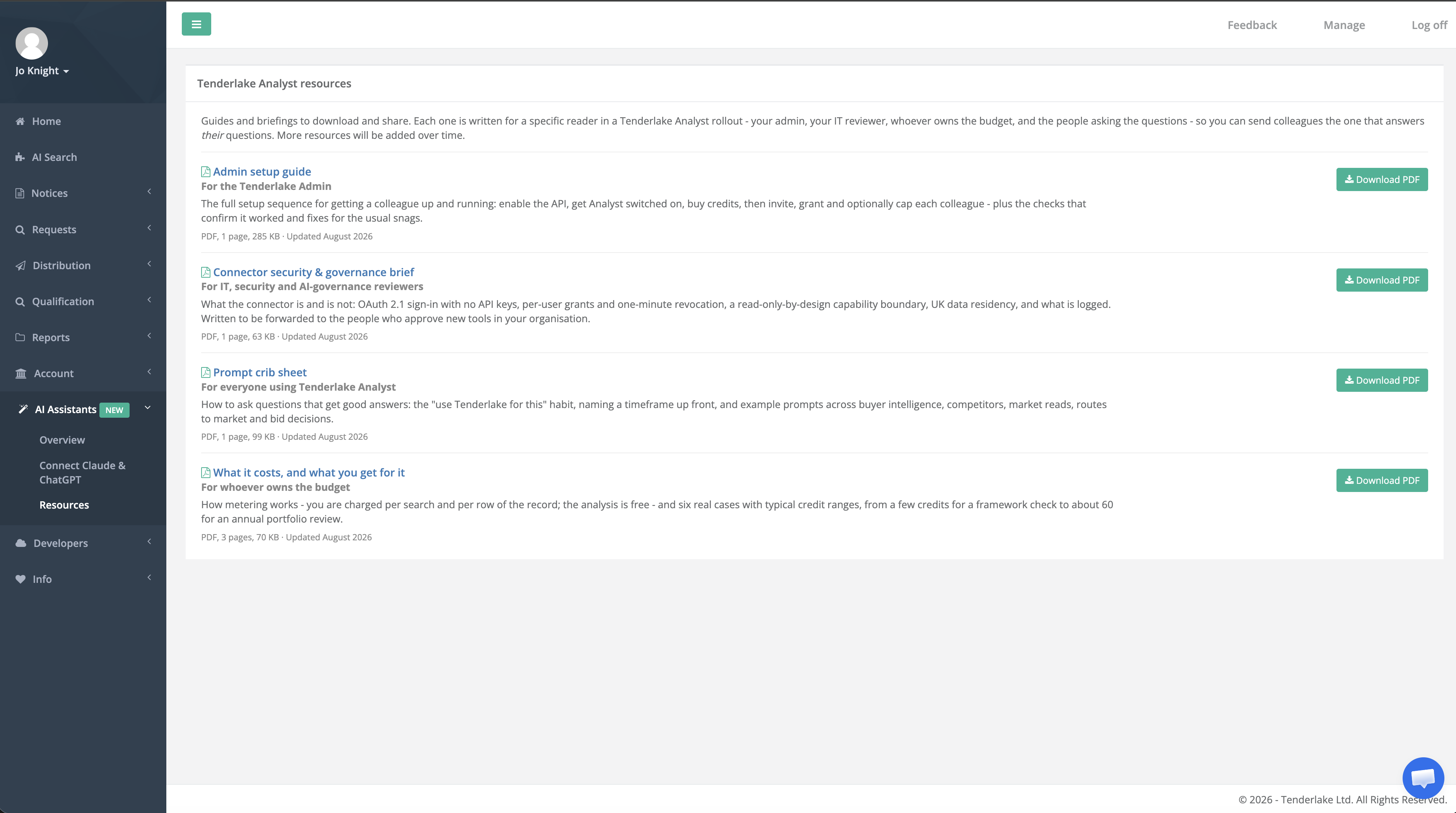
Sign in at app.tenderlake.com and go to AI Assistants › Resources. Each guide is written for one reader in an Analyst rollout, so you can send a colleague the one that answers their question rather than the whole story. All are one-page PDFs, apart from the costs document.
The full sequence for getting a colleague up and running: enable API access, switch Analyst on, buy credits, then invite, grant and optionally cap each colleague. Includes the checks that confirm it worked and fixes for the snags that come up most often.
What the connector is and is not. Written to be forwarded to whoever approves new tools in your organisation.
How to ask questions that get good answers, with example prompts across buyer intelligence, competitors, market reads, routes to market and bid decisions.
How metering works, and six real cases with typical credit ranges — from a few credits for a framework check to around 60 for an annual portfolio review.
You need three things: a paid plan (Analyst is not available on the free trial), Tenderlake Admin rights in your workgroup, and credits.
The setup is three one-off steps for the workgroup and three per colleague, all inside Tenderlake. Nothing is installed and no API keys are ever shared or handled. The steps depend on each other and the controls stay greyed out until the earlier ones are done, so it is worth following them in order.
Open the Admin setup guide from AI Assistants › Resources and work through it. It names every screen, so you should not need to hunt for anything.
Analyst is switched on per workgroup, so an administrator has to enable it and buy credits. That is usually whoever set up your account or manages your seats. Access is then granted person by person, so they will need to grant it to you specifically.
Plenty of people see Tenderlake opportunities without ever signing in, they arrive by email, or through Microsoft Teams or Slack. If that is you, you will need a seat of your own before you can use Analyst.
Ask your Tenderlake administrator to add you as a user. Either a Pro or a Standard seat will do, and there is nothing for you to set up afterwards: no searches, no folders, no monitoring to configure. All Analyst needs is a working login.
Once you are in the workgroup, your administrator can grant you access to Analyst from the same place.
Because Analyst runs inside your organisation’s own AI assistant, some IT and AI-governance teams will want to review the connector before it is used. That is a reasonable request and we have written the answer down so you are not the one fielding it.
The Connector security and governance brief covers OAuth 2.1 sign-in with no API keys, access granted per user and revocable in about a minute, a read-only-by-design capability boundary, where data is held, and what gets logged. It is one page and written to be forwarded rather than summarised.
Worth knowing before you send it. Your reviewer will not usually have a Tenderlake login, so download the PDF from AI Assistants › Resources and attach it.
Analyst runs on a paid Tenderlake Monitor subscription. Monitor finds the opportunities matched to your business; Analyst explains the market those opportunities sit in.
Book a demo and we will walk you through both, using your own buyers and competitors rather than a demo account.
Each colleague adds the connector in their own assistant and signs in with their Tenderlake login; about a minute, no keys or codes to copy. Instructions for Claude, ChatGPT and the others are under AI Assistants › Connect Claude & ChatGPT, and you can send colleagues straight to that page.
To check it is working, ask in a new chat: “Using the Tenderlake connector, which account am I connected as?” It should answer with your workgroup.
Administrators can see who has access, when they last used it and what they have spent under AI Assistants › AI Assistant Access, and can revoke access from the same page at any time.
Questions, credits or Analyst activation: speak to your account manager.
Learn more about Tenderlake Analyst