Recommended Procurement Notices
Tenderlake now recommends notices that are likely to be relevant for each user.
Tenderlake now recommends notices that are likely to be relevant for each user.
Tenderlake can identify procurement notices, that are highly likely to be relevant for you, but are not being matched with any of your saved searches.
It is a unique way of avoiding missing relevant procurement notices when the buyer describes what they want to buy in a manner you had not expected (and therefore is not searching for it).
Tenderlake recommends notices that are likely to be relevant for each user.
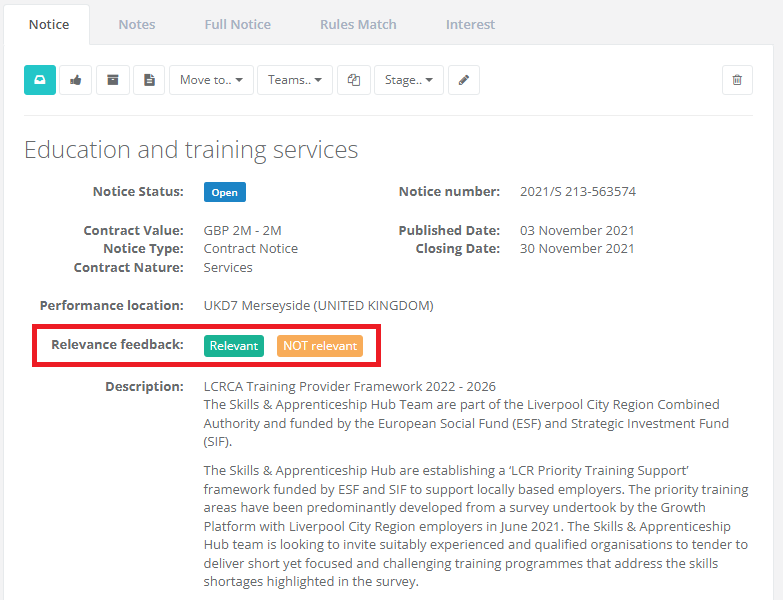
On each procurement notice, you can provide relevance feedback.
Tenderlake uses this feedback to recommend you additional procurement notices, you may otherwise not become aware of.
Some tips for providing relevance feedback:
A notice should be marked “Relevant” if
A notice should be marked “NOT relevant” if
Marking a notice as Relevant, does not mean you are necessarily going to bid for it. Relevant means, it is relevant to know about an opportunity such as this one.
Dos and Don’ts about Relevance Feedback
By navigating to Notices -> Recommendations you can see your personal recommendations.
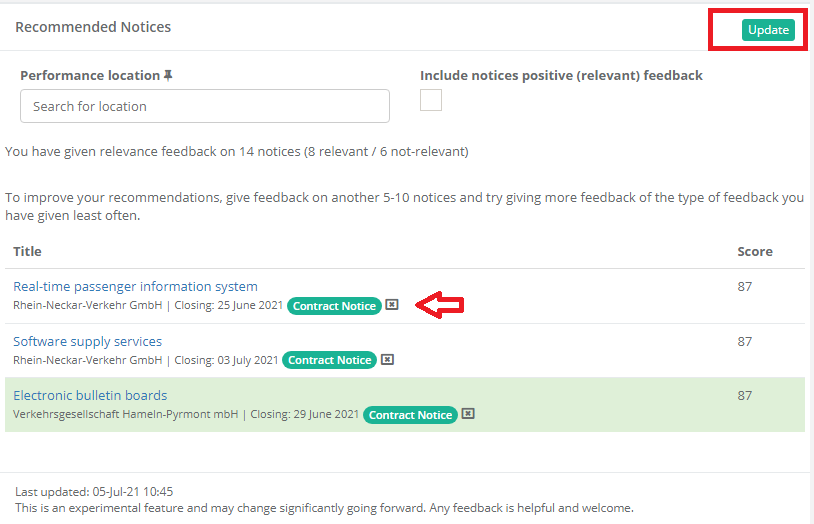
Recommendations are based on the relevance feedback you have provided and is updated daily.
Recommendations can be filtered for performance location, just like searches.
Click the update button to refresh your view if you have changed performance location or have checked the checkbox to include recommended notices you have given positive feedback on.
To remove a notice from the list without giving feedback, click the little X next to the notice type badge (see red arrow). This can be used if you want to a notice removed from the list, but it’s not clear if it is relevant for not-relevant or if it contains both relevant and not-relevant elements.
When removing a notice from the list using the little X, you are not giving any signal back regarding the notice’s relevance.
Recommended notices is an experimental feature, and we are keen to hear you feedback, including on the recommendations provided.
What’s the difference between “Discovered Notices” and “Recommended Notices”?
Discovered Notices are predicted on a company wide level. Feedback from all users is considered, whereas Recommended Notices are individual recommendations.
Recommended Notices are not included in your daily alerts.
Recommended Notices uses a recommendation algorithm that is better suited for identifying relevant notices that span a wide range of interests, whereas Discovered Notices is more focused on identifying notices in one in the workgroup’s primary area of interest.