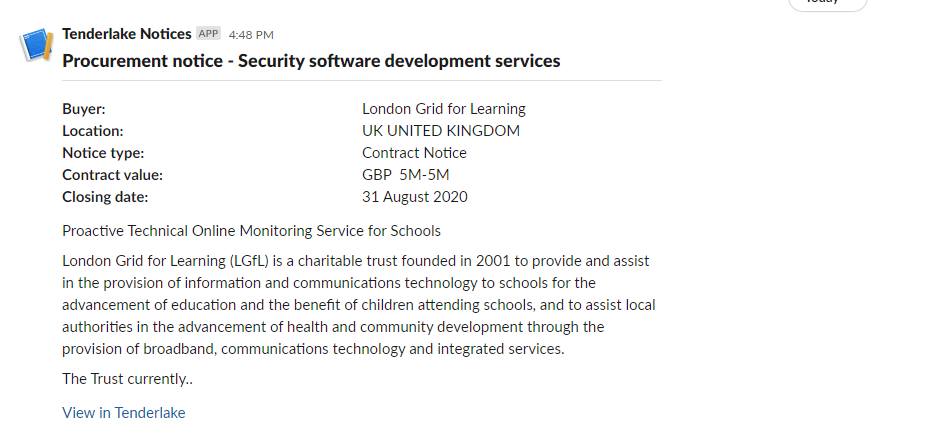
How to get Tenders and Procurement Notices into Slack
Step-by-step guide to get procurement notices, tenders and public contracts into Slack.
Step-by-step guide to get procurement notices, tenders and public contracts into Slack.
You can now get tenders and other procurement notices directly from Tenderlake into Slack. (Microsoft Teams version here)
Tenderlake is now integrating with both Slack and Microsoft Teams to make it easier to collaborate round all aspects of finding, evaluating and winning contracts.
It is easy to connect Tenderlake with Slack – just follow the step-by-step guide below or watch the video at the end of the page:
1/
First, you need to obtain a link to the Slack channel you want to post to. The link is commonly referred to as a webhook.
Go to this page on Slack.
Follow the instructions to create a webhook to the relevant channel.
Name your Slack app Tenderlake.
2/
Login to Tenderlake and go to Distribution -> Connectors.
Click the Add Slack Webhook button and paste the webhook into the form and give it a relevant name – typically the name of the channel you will be posting the procurement notices to.
3/
Now, whenever you view a procurement notice in Tenderlake, you will see a button that can post a summary of the notice directly into Slack.
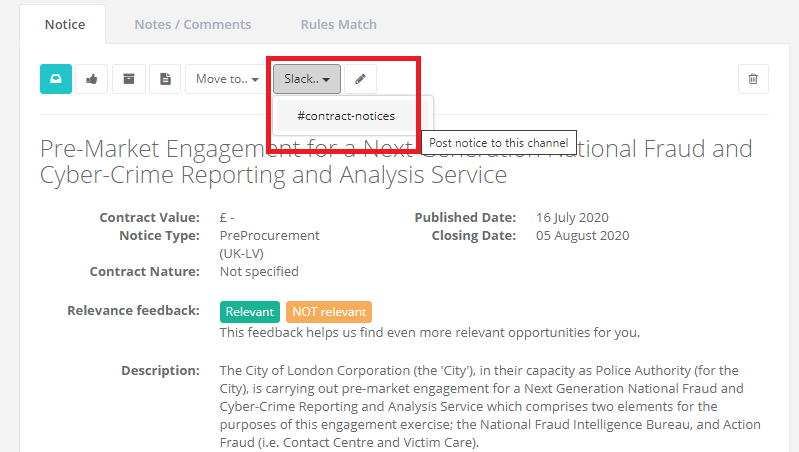
That’s it!
Now you can post procurement notices directly from Tenderlake to Slack.
The video below walks you through the steps: