Monitoring Public Sector Frameworks
Monitor existing frameworks, see when they are coming to an end and who have been awarded contracts under the framework.
Monitor existing frameworks, see when they are coming to an end and who have been awarded contracts under the framework.
Frameworks are a popular way for public and third sector organisations to procure services.
A procurement framework is essentially a list of pre-approved suppliers, where terms and conditions have been agreed. There are currently more than 100,000 active frameworks in Tenderlake.
With Tenderlake you can quickly answer questions such as..
While your standard alerts in Tenderlake will alert you when new frameworks are announced, it is often of interest to understand which existing frameworks, you may want to join the next time they become available to join.
By knowing which future frameworks, you are interested in joining, you can prioritise your bid resources, and will have more time to perfect your bid, than the standard 4-5 weeks that is normally given from a framework is announced.
With Tenderlake you can search for frameworks by the title of the framework, the primary buyer, or any other buying organisations that can also use the framework.
You can also find relevant frameworks by searching for the suppliers who have been awarded contracts under them.
This means you can easily see which frameworks your competitors have joined; something that may inspire you to consider joining when the successor framework opens for bids.
To search for existing frameworks, go to
Reports -> Frameworks
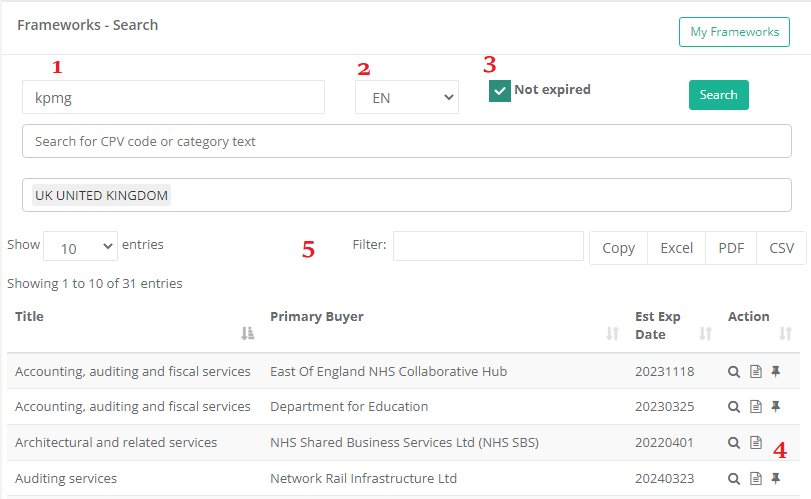
In the textbox (1), you can search using simple or advanced text search. (Learn more about Advanced Search)
You can search in the local language (2). It is always a good idea, even if you are searching for buyers or suppliers.
To only see frameworks that have not expired, check the Not expired checkbox (3).
Once you have a set of search results, you can further filter them by typing a text into the Filter-box (5). It updates in real-time as you type, so you should not press the Search button when using this filter box.
To the right of the search results, you will find three “action icons” (4). The first will show the framework details. The second will show all suppliers who have been awarded under the framework.
The final icon (the pin) allows you to “pin” a framework to My Frameworks in case you want to quickly find it again.
Frameworks can also be used to find distributors and partners:
Search for frameworks that includes services based on your company’s products. The suppliers on these frameworks are potential channel partner candidates.